From Request to Paid, a Faster AI Assistant, and the Quote You Forgot: 5 Updates for Home-Service Shops
Most shops don't lose money on the work. They lose it in the gaps: the request that sat in an inbox, the tech who drove across town twice, the website visitor who left because nobody answered, the quote that went out and never got a second touch.
This week's updates to the Local Advantage system close those gaps. Four are new features. The fifth is a follow-up play you can run with what you already have. Here's what each one does, how a plumber, HVAC shop or landscaper would use it, and what you need to do.
Quick summary: this week in 30 seconds
Request to paid (available now): requests, estimates, jobs, routes, on-the-way texts, invoices and a booking page that checks the ZIP.
Faster AI assistant: typical text and chat replies in about 1.7 seconds, at about the same cost per reply.
"What happened to this lead?": ask us — we check the path and send you a PDF report.
Website chat that books: your AI assistant answers visitors and offers times on your calendar.
Old-quote playbook: quiet quotes get a check-in and a call task. Not a new feature; set it up this week.
1. Run the job from request to paid, in one place
What it does
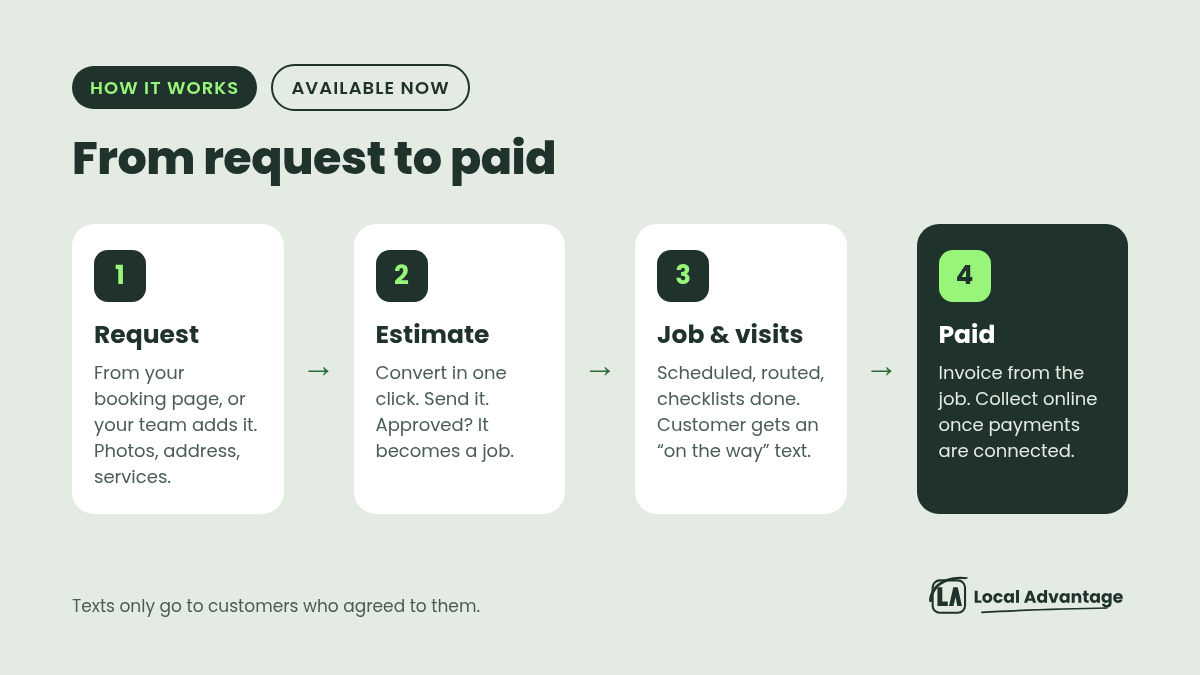
A full field-service setup is available now through Local Advantage — we can set it up for you. It's built around how trades actually work: requests, jobs and visits, not just appointments. It covers the whole job in one place:
Request: customers send one from your booking page, or your team adds it. It holds the contact, address, description, photos and the services they want. You can schedule a site visit before the work is agreed.
Estimate: turn a request into an estimate or a job in one click. Send the estimate. When it's approved, it becomes a job.
Job and visits: one customer, one address, all the work, across as many visits as it takes. Checklists, notes, a timer on every visit, and a status that moves on its own from Unscheduled to Scheduled, In progress and Closed.
Paid: invoice straight from the job, even after one visit of several. See what's invoiced, paid and outstanding. Collect online once a payment provider is connected.
Three pieces matter most in the truck:
Route optimization. It proposes a route for each tech, from their start location to their end location, and shows the drive time saved before anything changes. You apply it only if you like it. Lock any visit that has to keep its time, and the rest get reordered.
"On the way" texts. Customers, techs and dispatchers can get updates by email or text at key moments: new request, visit reminder, staff on the way, visit completed. You write each message. Texts only go to customers who agreed to them.
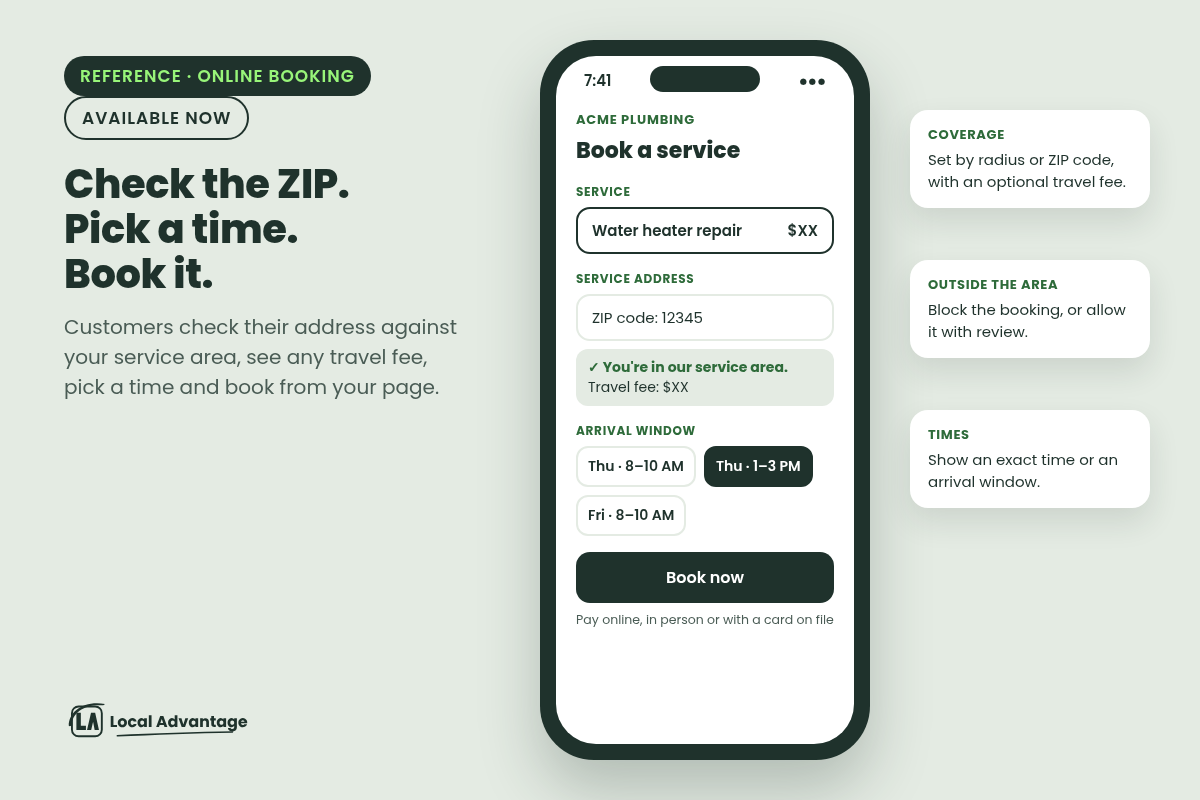
A booking page that checks the address. Customers browse your services, check their address against your service area, pick a time and pay online, in person or with a card on file. You set coverage by radius or ZIP code, add an optional travel fee and extra time before visits, and decide what happens outside your area: block the booking or allow it with review.
Where Google supports it, customers can also find and book you from your Google Business Profile. And your AI assistant can answer questions about your services, prices and service areas and take requests in chat for your team to follow up.
Examples
Plumber: A homeowner books "water heater repair" from your page at 9 PM. Their ZIP is inside your area, so the booking goes through with your travel fee shown up front. In the morning it's on the schedule, already tied to an address and their photos.
HVAC: Five tune-ups and two no-heat calls on the board. Lock the two no-heat visits to their times, let route optimization reorder the tune-ups, and check the drive time saved before you apply it. The customer gets a text when the tech is on the way.
Landscaper: Set your coverage by ZIP code. Inside your core towns, no fee. One ring out, a travel fee. Past that, bookings come in for review instead of landing on the schedule. Bill the spring cleanup after the first visit and the mowing as you go.
Try this
Pull up last week's schedule. Mark every day a truck crossed town twice. That's what route optimization is for. Then write down your service area as a list of ZIP codes: inside, one ring out (travel fee), and "call us first". That list is most of your booking page setup.
How to use it
It's available now through Local Advantage — we can set it up for you. Send us your service list, your service area (ZIP codes or a radius), any travel fee, and who your techs are, and we'll get it ready for your shop.
2. A smarter, faster AI assistant
What it does
Your AI assistant's text and chat replies now run on a newer model, the one now recommended for this kind of assistant.
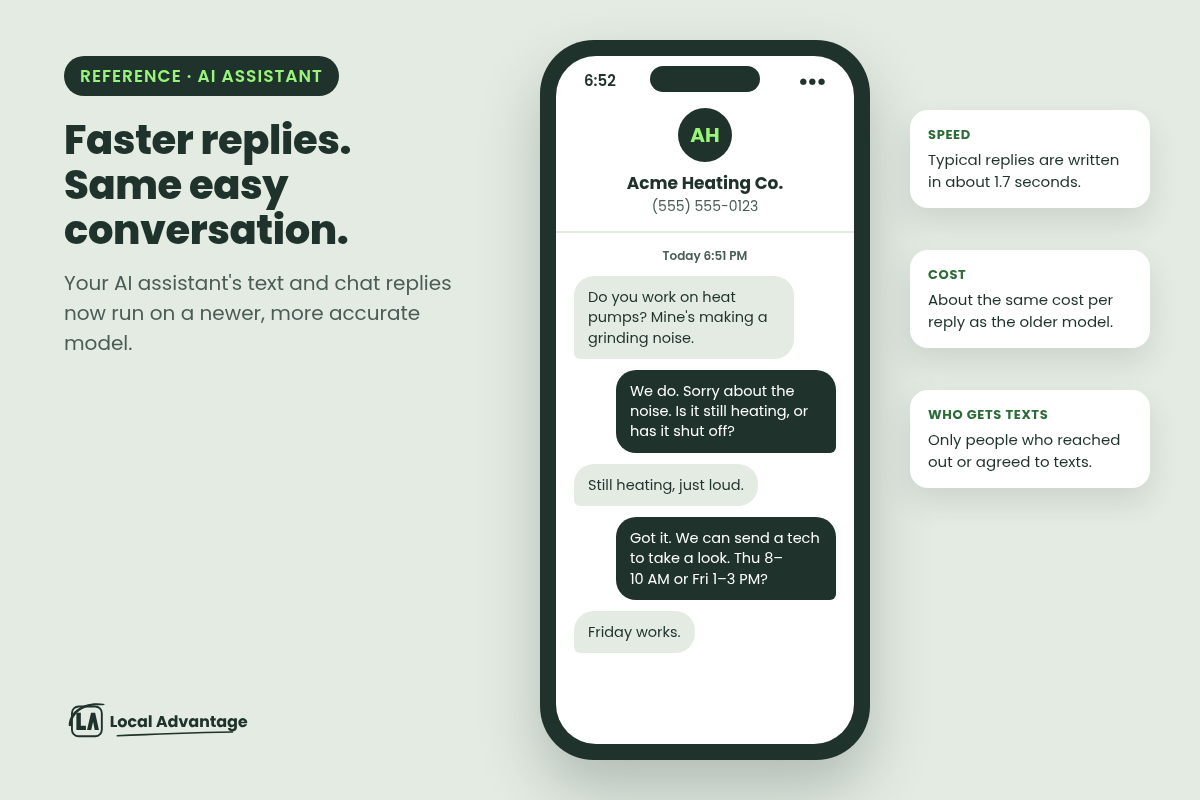
Faster: typical replies are written in about 1.7 seconds.
More accurate: it gave more accurate answers than the older model in the platform's own testing.
About the same cost per reply as the older model.
New assistants start on it by default. We've already moved our clients' text and chat assistants over. If you notice anything off in a reply, tell us and we'll adjust.
Examples
HVAC: A homeowner texts at 6:50 PM: "Mine's making a grinding noise." The assistant asks if it's still heating, then offers two visit times. The reply shows up while they're still holding the phone.
Plumber: Someone asks in your website chat whether you do tankless water heaters in their town. A fast, correct answer keeps them on your site instead of the next company on the list.
Landscaper: "Do you do fall cleanups?" gets a straight answer and a next step, not a wait.
“A homeowner with a problem texts three companies. Be the one that answers while they're still holding the phone.”
Typical replies now come back in about 1.7 seconds.
How to use it
Nothing to do. We've already moved our clients' text and chat assistants over. If you notice anything off in a reply, tell us and we'll adjust.
3. Ask "what happened to this lead?" and get the answer
What it does
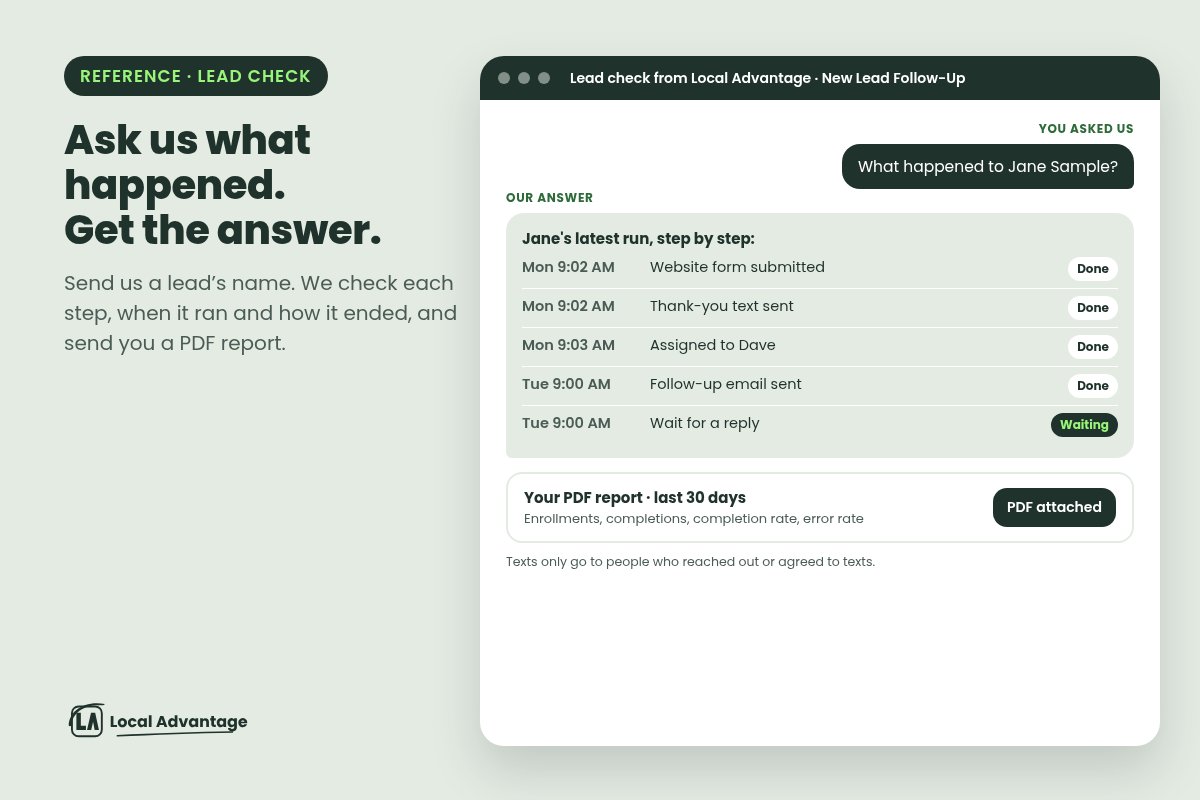
We can now check what happened to any lead in your follow-ups and send you a clear report. You don't need a new tool for this — we run it for you.
One lead's path: we look up a named customer and see their latest run step by step, with the time and the outcome of each step.
Every follow-up they're in: which ones they entered, how many times, how each one ended, and whether they're in one right now.
What changed: who edited a follow-up and exactly what changed, with a confidence level when we check whether an edit caused a problem: "Direct cause", "Lines up" or "Can't tell".
Reports: we can pull a performance report as a PDF you can keep. Compare two follow-ups on enrollments, completions, completion rate and error rate, or rank them to find the weak ones.
Reports stay private. We run the lookup and send you the answer — clients don't get the tool themselves.
Before: dig for it
Open the history, then the logs, then the version list
Piece together what happened by hand
Screenshots for the monthly report
Now: ask
Ask us: “What happened to Jane Sample?”
We send each step, with the time and how it ended
PDF report you can keep
Examples
Plumber: "The Johnson lead says nobody called back." Ask us what happened to Johnson, and we'll show that the thank-you text and the follow-up email went out and the call task went to a tech who was on vacation. Fix the assignment, not the whole system.
HVAC: Ask us for a 30-day performance report on your tune-up reminder as a PDF, and bring it to your Monday meeting instead of a pile of screenshots.
Landscaper: Ask us to compare your spring-cleanup follow-up with your mowing-contract follow-up to see which one more people finish.
How to use it
When you want to know what happened to a lead, send us the name and we'll pull the path and send you the report. Want a monthly PDF on your main follow-ups? Tell us which ones.
4. Website chat that answers and books
What it does
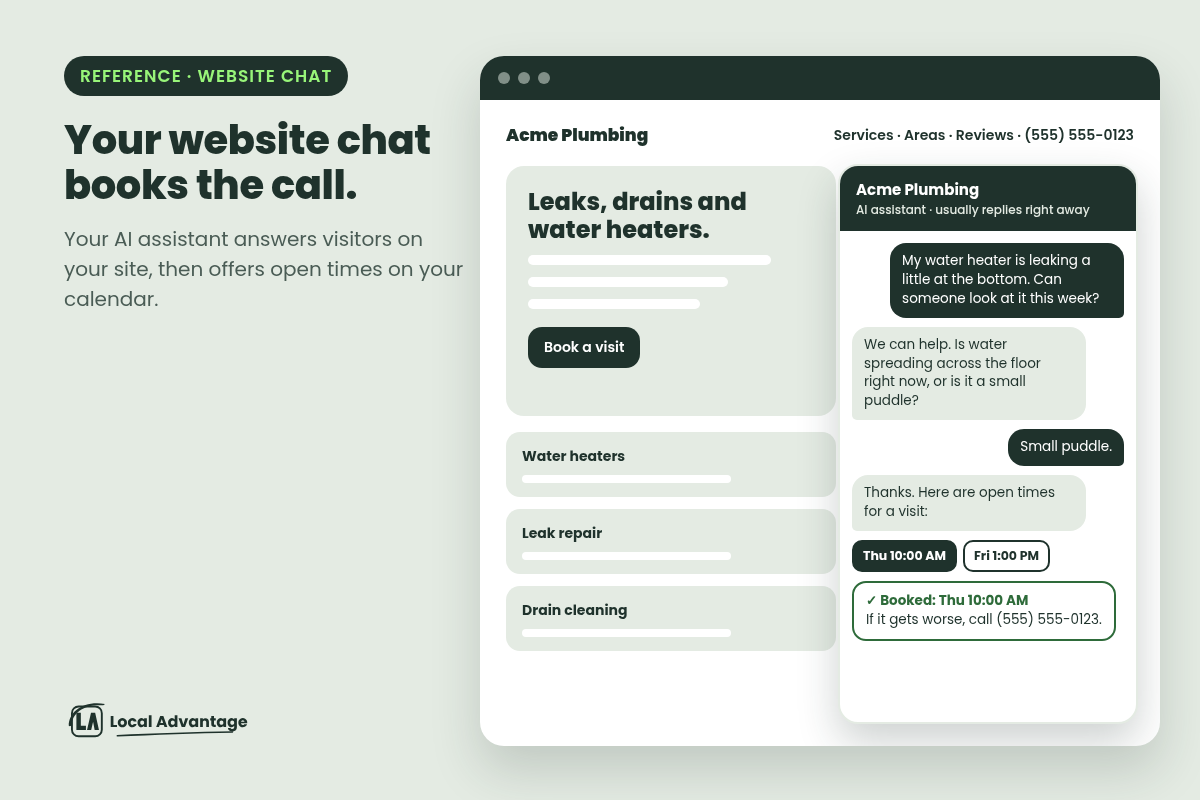
Your AI assistant can answer the chat on your website. Visitors ask a question, get an answer based on what we train it on, and can book: with booking turned on, it offers open times on your calendar and books the visit right in the chat. It can handle reschedules and cancellations too, if we turn those on.
What's new this week is faster setup: we can connect the assistant to your website chat, see which assistant is answering, and swap or remove it any time. You also choose who it answers, using tags, like "new leads, but not anyone who unsubscribed."
Examples
Plumber: "My water heater is leaking a little at the bottom. Can someone look at it this week?" The assistant asks how bad it is, offers Thursday at 10 or Friday at 1, and books it. If it's getting worse, it points them to your phone number.
HVAC: A visitor at 11 PM asks if you service heat pumps and what areas you cover. They get an answer and a Saturday estimate slot, not a contact form and a wait.
Landscaper: "Do you still have room for fall cleanups?" The assistant answers, offers the open times on your estimate calendar and books one.
Key takeaway
Your website shouldn't close at 5.
Visitors who ask a question at 11 PM get an answer and a time on your calendar, not a contact form and a wait.
How to use it
Send us your top 10 customer questions, your service area, and which calendar the chat should book on. We'll train the assistant, connect it to your website chat and test it before it goes live.
5. Playbook: follow up on old quotes
This one isn't a new feature. It's a follow-up you can set up this week with the system you already have.
What it does
Every shop has quotes that went out and went quiet. The homeowner didn't say no. They got busy. Most of the time, nobody follows up, because nobody remembers to.
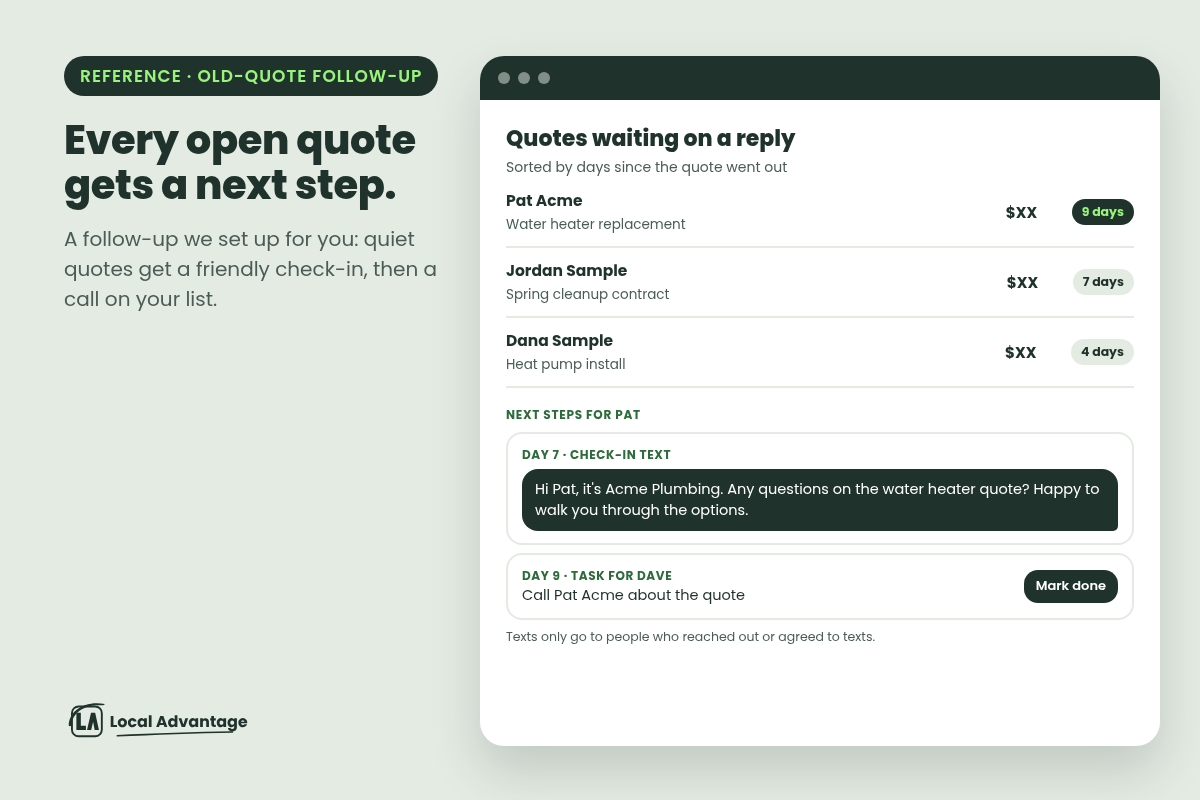
The fix is a simple rule: when a quote sits with no reply for a set number of days, two things happen.
A friendly check-in goes out by text or email, but only to customers who agreed to texts or reached out to you. No pressure, just "any questions?"
A call task lands on your list (or your office manager's) if they still haven't answered a couple of days later.
You pick the days. You write the message. Nothing goes out that you haven't approved.
Examples
HVAC: Replacement quote out for 7 days, no reply. The check-in goes out: "Any questions on the quote? Happy to walk you through financing options." Day 9, you get a task to call.
Plumber: Water heater replacement quote, 5 days quiet. One check-in text, then a call task for the office.
Landscaper: Spring contract quotes sent in February. A check-in in early March, before the season fills up, then a call list of anyone who hasn't answered.
Try this
Open your quotes from the last 60 days. Count the ones with no answer and no second touch. Each one is a homeowner who didn't say no. Start there, and only text the ones who agreed to texts.
How to use it
Tell us how long you wait before a quote counts as "gone quiet", and what you'd say if you called. We'll set up the check-in and the call task for you.
Set it up in 4 steps
1Pick the day a quote counts as "gone quiet" (say, 7 days).
2Write a short check-in: "Any questions on the quote?"
3Send it only to customers who agreed to texts or reached out.
4Add a call task 2 days later if there's still no reply.
FAQ
Is the field-service setup on my account?
It's available now through Local Advantage — we can set it up for you. Tell us you want it and we'll get started.
Will the "on the way" texts go to everyone?
No. Texts only go to customers who agreed to texts.
Does the faster AI assistant cost more?
Your price with us doesn't change.
Can the website chat take payments?
Don't count on it. It answers questions and books visits. Payment happens through your booking page or invoice.
Will the old-quote follow-up close more jobs?
We can't promise that. It makes sure every quote gets a second touch, which most quotes never get.
Do these guarantee more booked jobs?
No. They close the gaps where requests, visitors and quotes slip through.
See it for yourself
Not a Local Advantage client yet? Book a call, or call our AI assistant demo at (802) 491-4929 and hear it answer.
Already a client? Reply to our email and tell us which of these you want first.