Videos Made for You, Leads Split Fair, and AI That Watches Your Job Videos: 3 Updates for Home-Service Shops
You know you should be posting video. You don't have time to film, edit and caption it. Your estimators argue about who got the good leads. And the one great job walkthrough your tech filmed last spring is still sitting on his phone.
This week's updates to the Local Advantage system go after all three. Short branded videos made for you on a schedule. Leads handed out fair, turn by turn. And AI that watches your job videos, pulls out the good parts, and checks your ads before they go out. Here's what each one does, how a plumber, HVAC shop or landscaper would use it, and what you need to send us.
Quick summary: this week in 30 seconds
Branded short videos, made for you: up to 60 seconds, with your colors, logo, captions and end screen, on a schedule. We review every one before it posts.
Fair lead splits: even or weighted (like 60/40), handed out turn by turn, so estimators, crews or follow-up tests stay balanced.
AI that watches your job videos: summaries, transcripts and timestamped highlights, plus a logo and message check on ads before they go out.
Also new: referral commissions on one-time products, connecting your domain before a new site goes live, and a quarterly automation cleanup.
1. Branded short videos, made for you

What it does
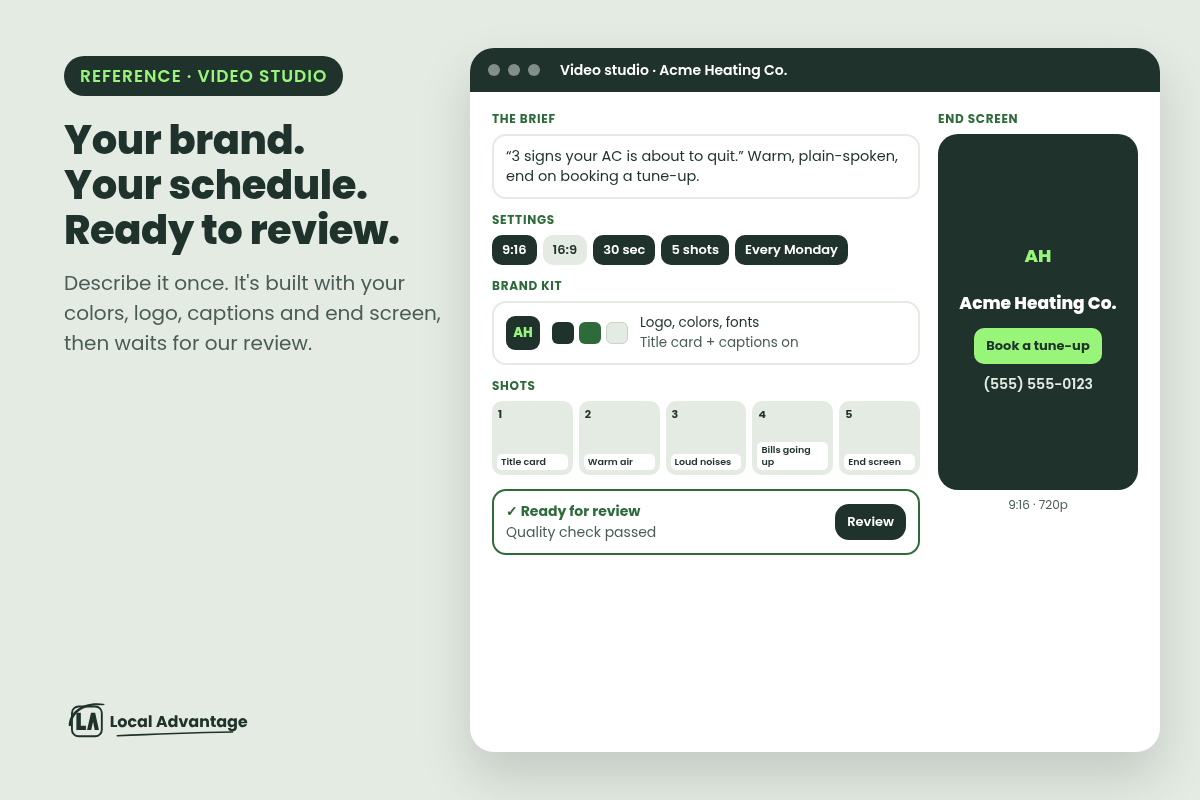
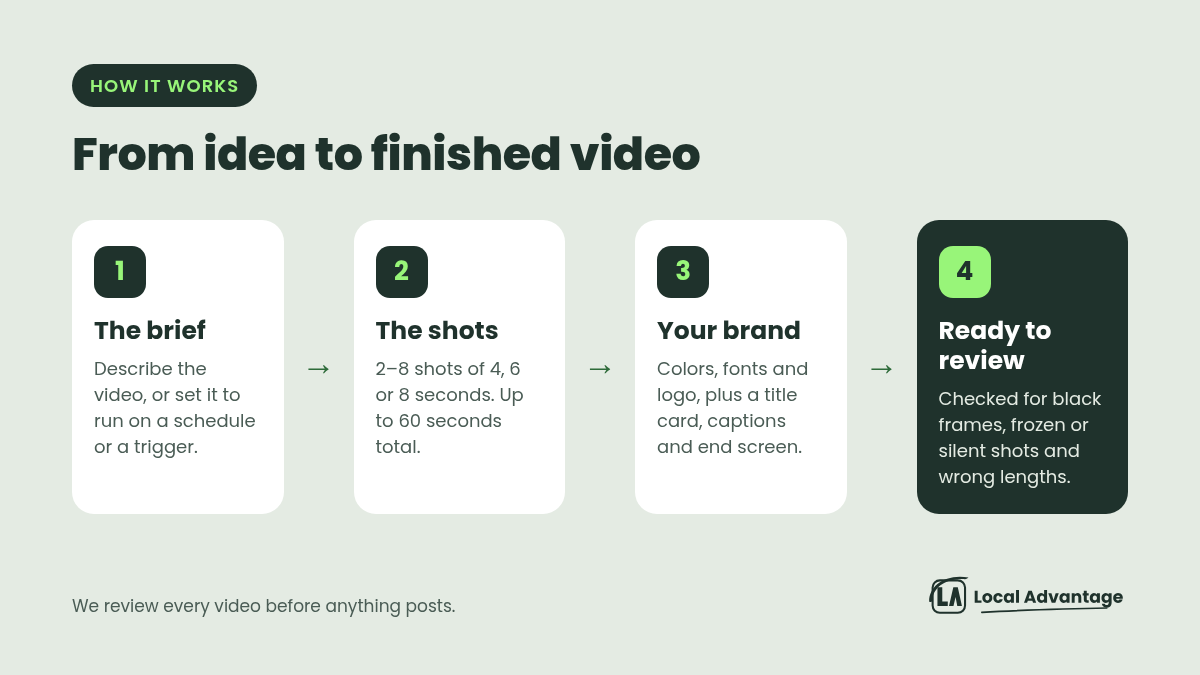
We can now have AI make short, finished videos for your business. Not one clip. A full short video with several scenes, your branding and a call to action at the end.
Length and shape: 2 to 8 shots, each 4, 6 or 8 seconds, up to 60 seconds total. Vertical (9:16) for Reels, Shorts and TikTok, or landscape (16:9) for your website and YouTube.
Your brand on every frame: your colors, fonts and logo, a branded title card, captions, and an end screen with your call to action.
The same look across scenes: people, outfits and settings stay consistent from shot to shot.
On a schedule or a trigger: set it to make a video every week, or when something happens, and the finished video comes back to us.
Checked before it reaches us: every video gets an automatic check for black frames, frozen or silent shots, and the wrong length.
Your own photos as bookends: you can open or close a video on an image you choose, like your truck or your crew.
We run this for you. We set up your brand kit, write the briefs and review every video before anything posts. One rule we hold to: these are AI-made scenes, not footage of your real jobs, so we never present them as real jobs or real customers.
Examples
HVAC: Every Monday in summer, a 30-second vertical video: "3 signs your AC is about to quit." Warm air, loud noises, a bill that keeps climbing. It ends on your logo and "Book a tune-up."
Any shop with an AI assistant: A 30-second promo that ends on the number your AI assistant answers, so the call to action is a call that always gets picked up.
Landscaper: A spring cleanup film for March and a fall cleanup film for October, each ending on your booking link.
Plumber: A freeze-prep video before the first cold snap: "Three things to do before tonight." End screen: your number and "Book a winter check."
Try this
Write down the three questions customers ask you most on the phone. Each one is a 30-second video. Send us the list with your logo and colors, and that's your first month of videos.
How to use it
Send us your logo, your brand colors, three video topics you'd want every season, and how often you'd post. We'll build your brand kit, set the schedule and send you the first videos to approve.
A good first month looks like this: one evergreen topic you can run all year ("what to do when your water heater leaks"), one seasonal topic for right now, and one promo that ends on your phone number or booking link. Four videos a month beats the 40 you planned and never made. Once you see which topics people watch and call about, we make more of those.
What it won't do: replace your real jobs. Homeowners trust a real tech in a real driveway. Use the AI videos for tips, reminders and promos, and use your own job videos (section 3) for proof.
2. Fair lead splits that stay even
What it does
Your automations can now hand out new leads two new ways:
Even split: each new lead goes to the next path in turn, so the groups stay even.
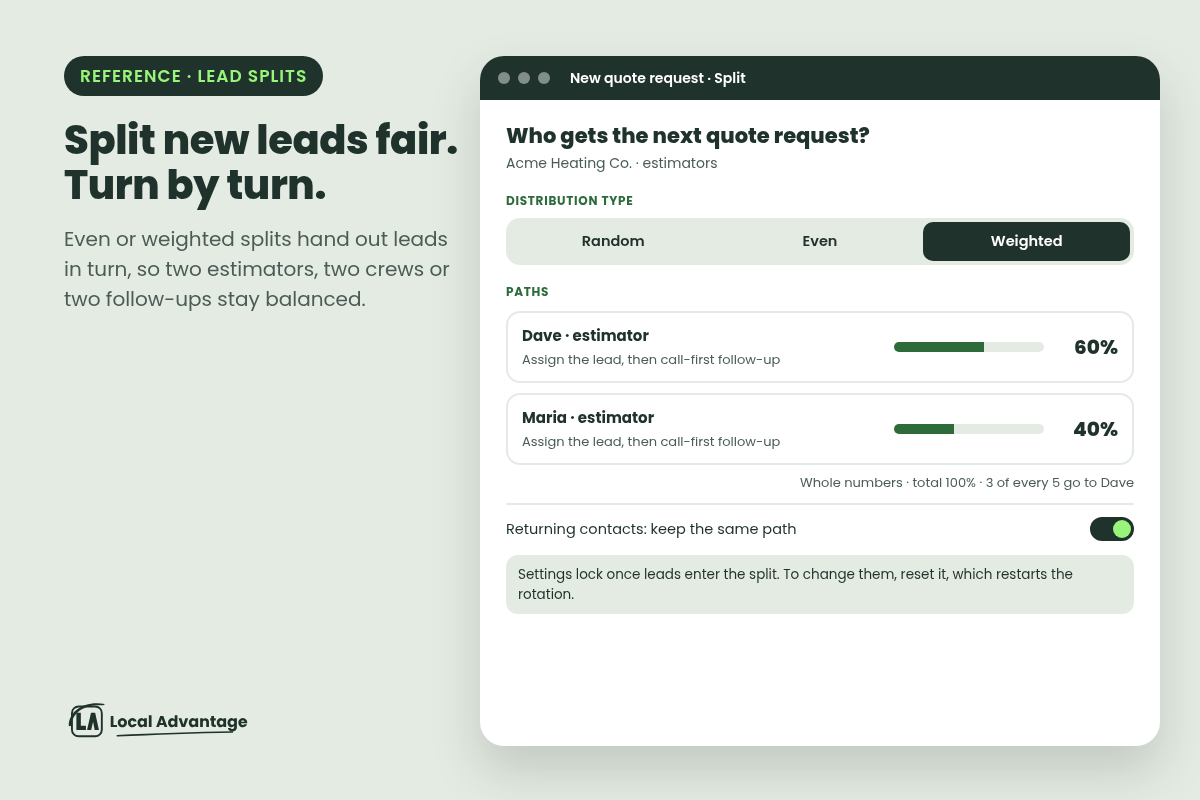
Weighted split: same turn-by-turn handout, but by the shares you set. A 60/40 split sends 3 of every 5 new leads one way and 2 the other way.
Why it matters: the old way used random assignment. Even with 50/50 set, random doesn't guarantee equal groups, especially when only a few leads come in a week. Turn-by-turn keeps them balanced as leads arrive.
Random split
50/50 set, but 7 and 3 after 10 leads is possible
Small weeks swing the most
Hard to compare two follow-ups fairly
Even or weighted split
Leads handed out in turn
60/40 means 3 of every 5 go one way
Groups stay balanced as leads arrive
A few details we handle for you:
A returning lead can stay on the same path they had before, so a repeat customer keeps the same estimator.
Once leads start flowing through a split, its settings lock. To change them, we reset it, which restarts the rotation.
You can use a split for two different jobs. One is rotation: each path assigns the lead to a different person or crew. The other is testing: each path runs a different follow-up, and because the groups stay balanced, you can compare how each one does.
Examples
HVAC, two estimators: Dave and Maria alternate new quote requests with an even split. No more "he gets all the good ones."
Landscaper, two crews: Crew A can handle more work than Crew B this season, so new requests split 70/30. When Crew B adds a guy, we change the split.
Plumber, old-quote follow-up: Half of your quiet quotes get a text first, the other half get a call first. The groups stay balanced even if only six quotes go quiet in a month. Texts only go to customers who agreed to texts.
“Nothing kills a sales team faster than ‘he gets all the good leads.’ Turn by turn ends that argument.”
Even and weighted splits hand out new leads in turn, so the groups stay balanced.
How to use it
Tell us who should get new leads and in what share. If you want to test two follow-ups, tell us the two you want to compare. We'll build the split and tell you when there's enough to read.
One honest note on testing: a split keeps the groups fair, but it doesn't make a small test big. If only a handful of quotes go quiet each month, give it a few months before you call a winner. And change one thing at a time. If path A texts first and also offers $XX off, you won't know which part worked.
3. AI that watches your job videos
What it does
AI can now watch a video, both the picture and the sound, and tell you what's in it.
Summaries, transcripts and timestamped highlights, so you can find the good 20 seconds without watching the whole thing.
Questions about the video: "What did the tech say about the expansion tank?" "Where does the customer talk about the price?"
Ad and video review: check whether specific visuals, logos or messages appear. Use it on your ads, and on the AI-made videos from section 1 before they go out.
Content from what's in it: use the summary and highlights to draft blog posts, captions and social posts.
It works with uploaded videos (MP4, MOV and other common formats, up to 2 GB) and public YouTube links, including Shorts.
We run this for you. Send us the video and tell us what you want out of it.
Examples
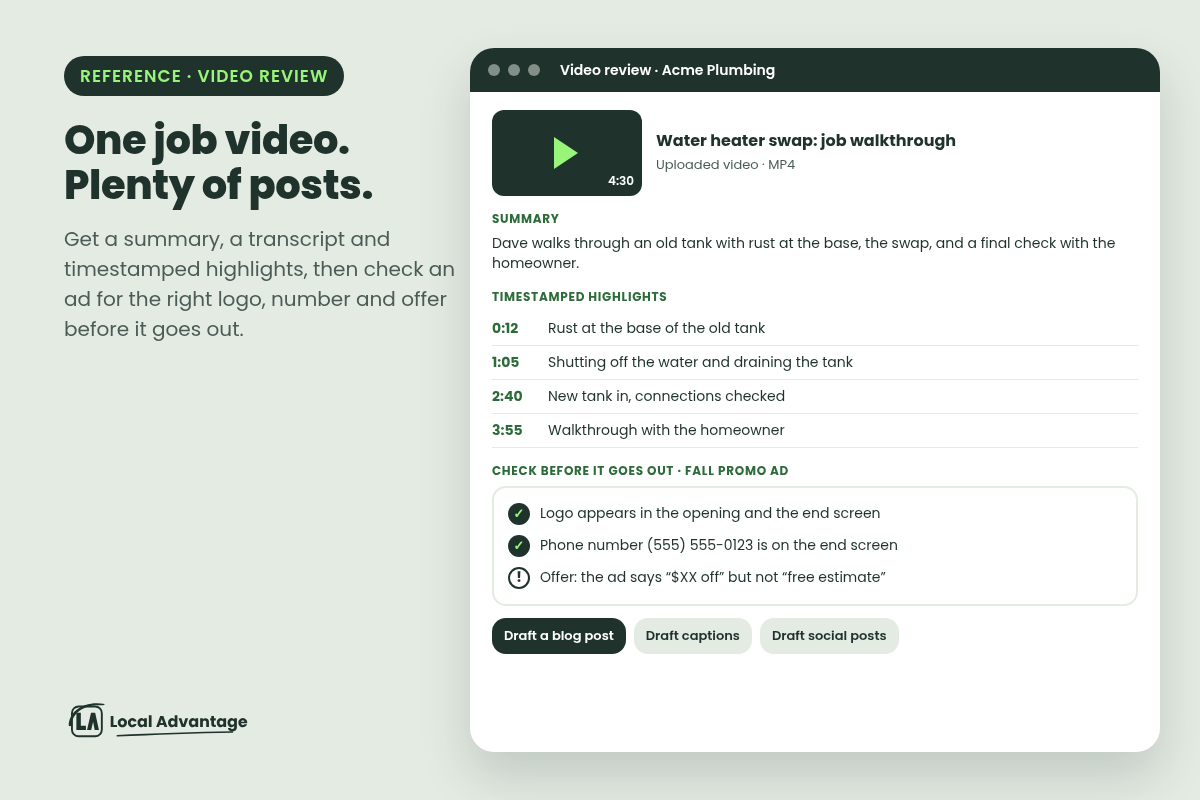
Plumber, job walkthrough: Your tech films a 4-minute water heater swap. We pull the timestamped highlights (rust at the base, the drain, the new tank, the walkthrough with the homeowner) and turn them into a blog post, captions for a short clip and three social posts.
HVAC, customer video: A happy customer agrees to record a short video. We get a transcript, pull their best line with the timestamp, and use it in a post, in their own words, with their permission.
Any shop running ads: Before an ad video goes out, we check it for the right logo, the right phone number and the right offer. If the offer line is missing, we fix it before it runs, not after.
Key takeaway
Your best marketing is already on your techs' phones.
One real job walkthrough can become a blog post, a captioned clip and social posts. We do the watching and the writing.
How to use it
Send us job videos as you get them: walkthroughs, before-and-afters, customer videos you have permission to use. For ads, send the video before it goes live and we'll run the check.
How an ad gets checked before it runs
1You send us the ad video before it goes live.
2AI checks it for your logo, your phone number and your offer.
3We look at anything it flags and fix it.
4You approve it, then it runs.
Most shops already have the raw material. Your techs film the old unit, the mess, the finished install. It's on their phones. One 4-minute walkthrough can give you a blog post, a short clip with captions and several social posts, and it's real proof, not stock photos. The hard part was never the filming. It was having someone watch it, find the good parts and write it up. That's the part we take off your plate.
The ad check is a second set of eyes, not the only one. We still look at every ad ourselves before it runs.
Also new
Referral commissions on one-time products. If you sell one-time packages on your own website through your connected payment account, you can now pay a commission on each one, with its own rate per product. You can also ask referrers to accept your terms and add their tax form and payout method in one place, so you can see who's set up before you pay. For example, a landscaper selling an irrigation start-up package online could reward past customers who send buyers. Ask us before you set this up so we can check how you take payment.
Connect your domain before the site goes live. On new sites we build for you, we can connect your domain while the site is still in progress. It goes live on your domain once the domain setup checks out.
Quarterly automation cleanup. We can now pull a list of follow-ups with default names, follow-ups nobody has entered in 60 days, and empty folders. We review each one, keep the seasonal ones (your spring cleanup reminder sat quiet all winter for a reason), and only remove what's truly dead.
Try this
Open your automations and count how many you'd recognize by name. If it's less than half, ask us for a cleanup. We'll keep anything seasonal and show you the list before anything is removed.
FAQ
Do I have to film anything for the branded videos?
No. The scenes are AI-made. You can add your own photo to open or close a video, but you don't have to.
Will the videos post on their own?
No. We review every video before it goes out.
Are the AI videos real footage of my jobs?
No, and we never present them that way. For real jobs, send us your own videos and we'll turn them into content.
Will a split give every estimator the same number of leads?
An even split hands them out in turn, so the groups stay balanced as leads come in. A weighted split does the same by the shares you set.
Can I use any customer video?
Only ones the customer agreed to. We don't make up quotes or reviews.
Will these get me more jobs?
We can't promise that. They take the busywork out of video, lead handout and ad checks so those things actually get done.
See it for yourself
Not a Local Advantage client yet? Book a call, or call our AI assistant demo at (802) 491-4929 and hear it answer.
Already a client? Reply to our email and tell us which of these you want first.